CSOUND
RECORD AND PLAY BUFFERS
Playing Audio From RAM - flooper2
Csound offers many opcodes for playing back sound files that have first been loaded into a function table (and therefore are loaded into RAM). Some of these offer higher quality at the expense of computation speed some are simpler and less fully featured.
One of the newer and easier to use opcodes for this task is flooper2. As its name might suggest it is intended for the playback of files with looping. 'flooper2' can also apply a cross-fade between the end and the beginning of the loop in order to smooth the transition where looping takes place.
In the following example a sound file that has been loaded into a GEN01 function table is played back using 'flooper2'. 'flooper2' also includes a parameter for modulating playback speed/pitch. There is also the option of modulating the loop points at k-rate. In this example the entire file is simply played and looped. You can replace the sound file with one of your own or you can download the one used in the example from here:
Some notes about GEN01 and function table sizes:
When storing sound files in GEN01 function tables we must ensure that we define a table of sufficient size to store our sound file. Normally function table sizes should be powers of 2 (2, 4, 8, 16, 32 etc.). If we know the duration of our sound file we can derive the required table size by multiplying this duration by the sample rate and then choosing the next power of 2 larger than this. For example when the sampling rate is 44100, we will require 44100 table locations to store 1 second of audio; but 44100 is not a power of 2 so we must choose the next power of 2 larger than this which is 65536. (Hint: you can discover a sound file's duration by using Csound's 'sndinfo' utility.)
There are some 'lazy' options however: if we underestimate the table size, when we then run Csound it will warn us that this table size is too small and conveniently inform us via the terminal what the minimum size required to store the entire file would be - we can then substitute this value in our GEN01 table. We can also overestimate the table size in which case Csound won't complain at all, but this is a rather inefficient approach.
If we give table size a value of zero we have what is referred to as 'deferred table size'. This means that Csound will calculate the exact table size needed to store our sound file and use this as the table size but this will probably not be a power of 2. Many of Csound's opcodes will work quite happily with non-power of 2 function table sizes, but not all! It is a good idea to know how to deal with power of 2 table sizes. We can also explicitly define non-power of 2 table sizes by prefacing the table size with a minus sign '-'.
All of the above discussion about required table sizes assumed that the sound file was mono, to store a stereo sound file will naturally require twice the storage space, for example, 1 second of stereo audio will require 88200 storage locations. GEN01 will indeed store stereo sound files and many of Csound's opcodes will read from stereo GEN01 function tables, but again not all! We must be prepared to split stereo sound files, either to two sound files on disk or into two function tables using GEN01's 'channel' parameter (p8), depending on the opcodes we are using.
Storing audio in GEN01 tables as mono channels with non-deferred and power of 2 table sizes will ensure maximum compatibility.
EXAMPLE 06B01_flooper2.csd
<CsoundSynthesizer>

<CsOptions>
-odac ; activate real-time audio
</CsOptions>

<CsInstruments>
; example written by Iain McCurdy

sr 	= 	44100
ksmps 	= 	32
nchnls 	= 	1
0dbfs   =       1

; STORE AUDIO IN RAM USING GEN01 FUNCTION TABLE
giSoundFile   ftgen   0, 0, 262144, 1, "loop.wav", 0, 0, 0

  instr	1 ; play audio from function table using flooper2 opcode
kAmp         =         1   ; amplitude
kPitch       =         p4  ; pitch/speed
kLoopStart   =         0   ; point where looping begins (in seconds)
kLoopEnd     =         nsamp(giSoundFile)/sr; loop end (end of file)
kCrossFade   =         0   ; cross-fade time
; read audio from the function table using the flooper2 opcode
aSig         flooper2  kAmp,kPitch,kLoopStart,kLoopEnd,kCrossFade,giSoundFile
             out       aSig ; send audio to output
  endin

</CsInstruments>

<CsScore>
; p4 = pitch
; (sound file duration is 4.224)
i 1 0 [4.224*2] 1
i 1 + [4.224*2] 0.5
i 1 + [4.224*1] 2
e
</CsScore>

</CsoundSynthesizer>
Csound's Built-in Record-Play Buffer - sndloop
Csound has an opcode called sndloop which provides a simple method of recording some audio into a buffer and then playing it back immediately. The duration of audio storage required is defined when the opcode is initialized. In the following example two seconds is provided. Once activated, as soon as two seconds of live audio has been recorded by 'sndloop', it immediately begins playing it back in a loop. 'sndloop' allows us to modulate the speed/pitch of the played back audio as well as providing the option of defining a crossfade time between the end and the beginning of the loop. In the example pressing 'r' on the computer keyboard activates record followed by looped playback, pressing 's' stops record or playback, pressing '+' increases the speed and therefore the pitch of playback and pressing '-' decreases the speed/pitch of playback. If playback speed is reduced below zero it enters the negative domain in which case playback will be reversed.
You will need to have a microphone connected to your computer in order to use this example.
EXAMPLE 06B02_sndloop.csd
<CsoundSynthesizer>

<CsOptions>
; real-time audio in and out are both activated
-iadc -odac
</CsOptions>

<CsInstruments>
;example written by Iain McCurdy

sr 	= 	44100
ksmps 	= 	32
nchnls 	= 	1

  instr	1
; PRINT INSTRUCTIONS
           prints  "Press 'r' to record, 's' to stop playback, "
           prints  "'+' to increase pitch, '-' to decrease pitch.\\n"
; SENSE KEYBOARD ACTIVITY
kKey sensekey; sense activity on the computer keyboard
aIn        inch    1             ; read audio from first input channel
kPitch     init    1             ; initialize pitch parameter
iDur       init    2             ; inititialize duration of loop parameter
iFade      init    0.05          ; initialize crossfade time parameter
 if kKey = 114 then              ; if 'r' has been pressed...
kTrig      =       1             ; set trigger to begin record-playback
 elseif kKey = 115 then          ; if 's' has been pressed...
kTrig      =       0             ; set trigger to turn off record-playback
 elseif kKey = 43 then           ; if '+' has been pressed...
kPitch     =       kPitch + 0.02 ; increment pitch parameter
 elseif kKey = 45 then           ; if '-' has been pressed
kPitch     =       kPitch - 0.02 ; decrement pitch parameter
 endif                           ; end of conditional branches
; CREATE SNDLOOP INSTANCE
aOut, kRec sndloop aIn, kPitch, kTrig, iDur, iFade ; (kRec output is not used)
           out     aOut          ; send audio to output
  endin

</CsInstruments>

<CsScore>
i 1 0 3600 ; instr 1 plays for 1 hour
</CsScore>

</CsoundSynthesizer>
Recording to and Playback from a Function Table
Writing to and reading from buffers can also be achieved through the use of Csound's opcodes for table reading and writing operations. Although the procedure is a little more complicated than that required for 'sndloop' it is ultimately more flexible. In the next example separate instruments are used for recording to the table and for playing back from the table. Another instrument which runs constantly scans for activity on the computer keyboard and activates the record or playback instruments accordingly. For writing to the table we will use the tablew opcode and for reading from the table we will use the table opcode (if we were to modulate the playback speed it would be better to use one of Csound's interpolating variations of 'table' such as tablei or table3. Csound writes individual values to table locations, the exact table locations being defined by an 'index'. For writing continuous audio to a table this index will need to be continuously moving 1 location for every sample. This moving index (or 'pointer') can be created with an a-rate line or a phasor. The next example uses 'line'. When using Csound's table operation opcodes we first need to create that table, either in the orchestra header or in the score. The duration of the audio buffer can be calculated from the size of the table. In this example the table is 2^17 points long, that is 131072 points. The duration in seconds is this number divided by the sample rate which in our example is 44100Hz. Therefore maximum storage duration for this example is 131072/44100 which is around 2.9 seconds.
EXAMPLE 06B03_RecPlayToTable.csd
<CsoundSynthesizer>

<CsOptions>
; real-time audio in and out are both activated
-iadc -odac -d -m0
</CsOptions>

<CsInstruments>
; example written by Iain McCurdy

sr 	= 	44100
ksmps 	= 	32
nchnls 	= 	1

giBuffer ftgen  0, 0, 2^17, 7, 0; table for audio data storage
maxalloc 2,1 ; allow only one instance of the recording instrument at a time!

  instr	1 ; Sense keyboard activity. Trigger record or playback accordingly.
           prints  "Press 'r' to record, 'p' for playback.\\n"
iTableLen  =       ftlen(giBuffer)  ; derive buffer function table length
idur       =       iTableLen / sr   ; derive storage time in seconds
kKey sensekey                       ; sense activity on the computer keyboard
  if kKey=114 then                  ; if ASCCI value of 114 ('r') is output
event	"i", 2, 0, idur, iTableLen  ; activate recording instrument (2)
  endif
 if kKey=112 then                   ; if ASCCI value of 112 ('p) is output
event	"i", 3, 0, idur, iTableLen  ; activate playback instrument
 endif
  endin

  instr 2 ; record to buffer
iTableLen  =        p4              ; table/recording length in samples
; -- print progress information to terminal --
           prints   "recording"
           printks  ".", 0.25       ; print '.' every quarter of a second
krelease   release                  ; sense when note is in final k-rate pass...
 if krelease=1 then                 ; then ..
           printks  "\\ndone\\n", 0 ; ... print a message
 endif
; -- write audio to table --
ain        inch     1               ; read audio from live input channel 1
andx       line     0,p3,iTableLen  ; create an index for writing to table
           tablew   ain,andx,giBuffer ; write audio to function table
endin

  instr 3 ; playback from buffer
iTableLen  =        p4              ; table/recording length in samples
; -- print progress information to terminal --
           prints   "playback"
           printks  ".", 0.25       ; print '.' every quarter of a second
krelease   release                  ; sense when note is in final k-rate pass
 if krelease=1 then                 ; then ...
           printks  "\\ndone\\n", 0 ; ... print a message
 endif; end of conditional branch
; -- read audio from table --
aNdx       line     0, p3, iTableLen; create an index for reading from table
a1         table    aNdx, giBuffer  ; read audio to audio storage table
           out      a1              ; send audio to output
  endin

</CsInstruments>

<CsScore>
i 1 0 3600 ; Sense keyboard activity. Start recording - playback.
</CsScore>

</CsoundSynthesizer>
Encapsulating Record and Play Buffer Functionality to a UDO
Recording and playing back of buffers can also be encapsulated into a User Defined Opcode. This time the tabw opcode will be used for writing audio data to a buffer. tabw is slightly faster than tablew but doesn't offer the same number of protections for out of range index values.
An empty table (buffer) of any size can be created with a negative number as size. A table for recording 10 seconds of audio data can be created in this way:
giBuf1 ftgen 0, 0, -(10*sr), 2, 0
The user can decide whether they want to assign a certain number to the table, or whether to allow Csound do assign one automatically, thereafter calling the table via its variable name, in this case giBuf1. Below follows a UDO for creating a mono buffer, and another UDO for creating a stereo buffer:
 opcode BufCrt1, i, io
ilen, inum xin
ift       ftgen     inum, 0, -(ilen*sr), 2, 0
          xout      ift
 endop

 opcode BufCrt2, ii, io
ilen, inum xin
iftL      ftgen     inum, 0, -(ilen*sr), 2, 0
iftR      ftgen     inum, 0, -(ilen*sr), 2, 0
          xout      iftL, iftR
 endop
This simplifies the procedure of creating a record/play buffer, because the user is just asked for the length of the buffer. A number can be given, but by default Csound will assign this number. This statement will create an empty stereo table for 5 seconds of recording:
iBufL,iBufR BufCrt2 5
A first, simple version of a UDO for recording will just write the incoming audio to sequential locations of the table. This can be done by setting the ksmps value to 1 inside this UDO (setksmps 1), so that each audio sample has its own discrete k-value. In this way the write index for the table can be assigned via the statement andx=kndx, and increased by one for the next k-cycle. An additional k-input turns recording on and off:
 opcode BufRec1, 0, aik
ain, ift, krec  xin
          setksmps  1
if krec == 1 then ;record as long as krec=1
kndx      init      0
andx      =         kndx
          tabw      ain, andx, ift
kndx      =         kndx+1
endif
 endop
The reading procedure is just as simple. In fact the same code can be used; it will be sufficient just to replace the opcode for writing (tabw) with the opcode for reading (tab):
 opcode BufPlay1, a, ik
ift, kplay  xin
          setksmps  1
if kplay == 1 then ;play as long as kplay=1
kndx      init      0
andx      =         kndx
aout      tab       andx, ift
kndx      =         kndx+1
endif
 endop
Next we will use these first simple UDOs in a Csound instrument. Press the "r" key as long as you want to record, and the "p" key for playing back. Note that you must disable the key repeats on your computer keyboard for this example (in QuteCsound, disable "Allow key repeats" in Configuration -> General).
EXAMPLE 06B04_BufRecPlay_UDO.csd
<CsoundSynthesizer>
<CsOptions>
-i adc -o dac -d -m0
</CsOptions>
<CsInstruments>
;example written by Joachim Heintz
sr = 44100
ksmps = 32
nchnls = 1
0dbfs = 1

  opcode BufCrt1, i, io
ilen, inum xin
ift       ftgen     inum, 0, -(ilen*sr), 2, 0
          xout      ift
  endop

  opcode BufRec1, 0, aik
ain, ift, krec  xin
          setksmps  1
imaxindx  =         ftlen(ift)-1 ;max index to write
knew      changed   krec
if krec == 1 then ;record as long as krec=1
 if knew == 1 then ;reset index if restarted
kndx      =         0
 endif
kndx      =         (kndx > imaxindx ? imaxindx : kndx)
andx      =         kndx
          tabw      ain, andx, ift
kndx      =         kndx+1
endif
  endop

  opcode BufPlay1, a, ik
ift, kplay  xin
          setksmps  1
imaxindx  =         ftlen(ift)-1 ;max index to read
knew      changed   kplay
if kplay == 1 then ;play as long as kplay=1
 if knew == 1 then ;reset index if restarted
kndx      =         0
 endif
kndx      =         (kndx > imaxindx ? imaxindx : kndx)
andx      =         kndx
aout      tab       andx, ift
kndx      =         kndx+1
endif
          xout      aout
  endop

  opcode KeyStay, k, kkk
;returns 1 as long as a certain key is pressed
key, k0, kascii    xin ;ascii code of the key (e.g. 32 for space)
kprev     init      0 ;previous key value
kout      =         (key == kascii || (key == -1 && kprev == kascii) ? 1 : 0)
kprev     =         (key > 0 ? key : kprev)
kprev     =         (kprev == key && k0 == 0 ? 0 : kprev)
          xout      kout
  endop

  opcode KeyStay2, kk, kk
;combines two KeyStay UDO's (this way is necessary
;because just one sensekey opcode is possible in an orchestra)
kasci1, kasci2 xin ;two ascii codes as input
key,k0    sensekey
kout1     KeyStay   key, k0, kasci1
kout2     KeyStay   key, k0, kasci2
          xout      kout1, kout2
  endop


instr 1
ain        inch      1 ;audio input on channel 1
iBuf       BufCrt1   3 ;buffer for 3 seconds of recording
kRec,kPlay KeyStay2  114, 112 ;define keys for record and play
           BufRec1   ain, iBuf, kRec ;record if kRec=1
aout       BufPlay1  iBuf, kPlay ;play if kPlay=1
           out       aout ;send out
endin

</CsInstruments>
<CsScore>
i 1 0 1000
</CsScore>
</CsoundSynthesizer>
Next we will create an extended and easier to use version of these two UDOs for recording and playing back a buffer. The requirements of a user might be the following:
Recording:
- allow recording not just from the beginning of the buffer, but also from any arbitrary starting point kstart
- allow circular recording (wrap around) if the end of the buffer has been reached: kwrap=1
Playing:
- play back with different speed kspeed (negative speed means playing backwards)
- start playback at any point of the buffer kstart
- end playback at any point of the buffer kend
- allow certain modes of wraparound kwrap while playing:
- kwrap=0 stops at the defined end point of the buffer
- kwrap=1 repeats playback between defined end and start points
- kwrap=2 starts at a defined starting point but wraps between end point and beginning of the buffer
- kwrap=3 wraps between kstart and the end of the table
The following example provides versions of BufRec and BufPlay which do this job. We will use the table3 opcode instead of the simple tab or table opcodes in this case, because we want to translate any number of samples in the table to any number of output samples using different speed values. In short, we will need to read amplitude values that must be 'imagined' between two existing table value.
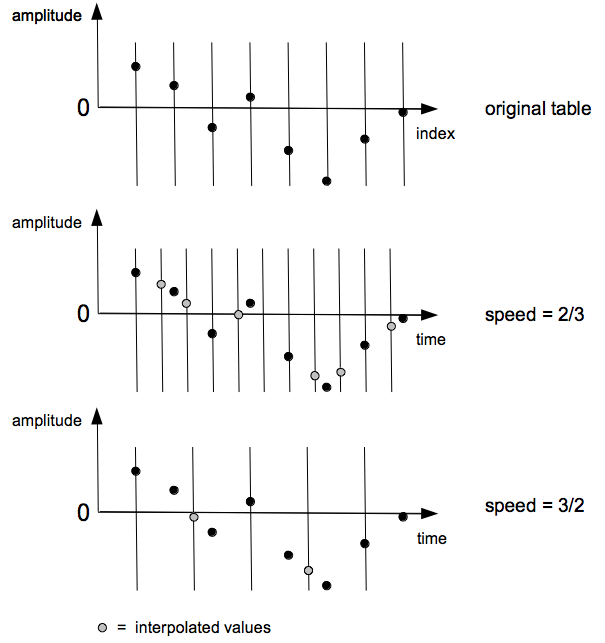
For higher or lower speed values than the original record speed, interpolation must be used in between certain sample values if the original shape of the wave is to be reproduced as accurately as possible. This job is performed with high quality by table3 which employs cubic interpolation.
In a typical application of recording and playing buffer buffers, the ability to interact with the process will be paramount. We can benefit from having interactive access to the following:
- starting and stopping record
- adjusting the start and end points of recording
- use or prevent wraparound while recording
- starting and stopping playback
- adjusting the start and end points of playback
- adjusting wraparound in playback using one of the specified modes (1 - 4)
- applying volume control to the playback signal
These interactions could be carried out via widgets, MIDI, OSC or something else. As we want to provide examples which can be used with any Csound frontend here, we are restricted to triggering the record and play events by hitting the space bar of the computer keyboard. (See the CsoundQt version of this example for a more interactive version.)
EXAMPLE 06B05_BufRecPlay_complex.csd
<CsoundSynthesizer>
<CsOptions>
-i adc -o dac -d
</CsOptions>
<CsInstruments>
;example written by joachim heintz
sr = 44100
ksmps = 32
nchnls = 2
0dbfs = 1

  opcode BufCrt2, ii, io ;creates a stereo buffer
ilen, inum xin ;ilen = length of the buffer (table) in seconds
iftL      ftgen     inum, 0, -(ilen*sr), 2, 0
iftR      ftgen     inum, 0, -(ilen*sr), 2, 0
          xout      iftL, iftR
  endop

  opcode BufRec1, k, aikkkk ;records to a buffer
ain, ift, krec, kstart, kend, kwrap xin
		setksmps	1
kendsmps	=		kend*sr ;end point in samples
kendsmps	=		(kendsmps == 0 || kendsmps > ftlen(ift) ? ftlen(ift) : kendsmps)
kfinished	=		0
knew		changed	krec ;1 if record just started
 if krec == 1 then
  if knew == 1 then
kndx		=		kstart * sr - 1 ;first index to write
  endif
  if kndx >= kendsmps-1 && kwrap == 1 then
kndx		=		-1
  endif
  if kndx < kendsmps-1 then
kndx		=		kndx + 1
andx		=		kndx
		tabw		ain, andx, ift
  else
kfinished	=		1
  endif
 endif
 		xout		kfinished
  endop

  opcode BufRec2, k, aaiikkkk ;records to a stereo buffer
ainL, ainR, iftL, iftR, krec, kstart, kend, kwrap xin
kfin      BufRec1     ainL, iftL, krec, kstart, kend, kwrap
kfin      BufRec1     ainR, iftR, krec, kstart, kend, kwrap
          xout        kfin
  endop

  opcode BufPlay1, ak, ikkkkkk
ift, kplay, kspeed, kvol, kstart, kend, kwrap xin
;kstart = begin of playing the buffer in seconds
;kend = end of playing in seconds. 0 means the end of the table
;kwrap = 0: no wrapping. stops at kend (positive speed) or kstart
;  (negative speed).this makes just sense if the direction does not
;  change and you just want to play the table once
;kwrap = 1: wraps between kstart and kend
;kwrap = 2: wraps between 0 and kend
;kwrap = 3: wraps between kstart and end of table
;CALCULATE BASIC VALUES
kfin		init		0
iftlen		=		ftlen(ift)/sr ;ftlength in seconds
kend		=		(kend == 0 ? iftlen : kend) ;kend=0 means end of table
kstart01	=		kstart/iftlen ;start in 0-1 range
kend01		=		kend/iftlen ;end in 0-1 range
kfqbas		=		(1/iftlen) * kspeed ;basic phasor frequency
;DIFFERENT BEHAVIOUR DEPENDING ON WRAP:
if kplay == 1 && kfin == 0 then
 ;1. STOP AT START- OR ENDPOINT IF NO WRAPPING REQUIRED (kwrap=0)
 if kwrap == 0 then
; -- phasor freq so that 0-1 values match distance start-end
kfqrel		=		kfqbas / (kend01-kstart01)
andxrel	phasor 	kfqrel ;index 0-1 for distance start-end
; -- final index for reading the table (0-1)
andx		=		andxrel * (kend01-kstart01) + (kstart01)
kfirst		init		1 ;don't check condition below at the first k-cycle (always true)
kndx		downsamp	andx
kprevndx	init		0
 ;end of table check:
  ;for positive speed, check if this index is lower than the previous one
  if kfirst == 0 && kspeed > 0 && kndx < kprevndx then
kfin		=		1
 ;for negative speed, check if this index is higher than the previous one
  else
kprevndx	=		(kprevndx == kstart01 ? kend01 : kprevndx)
   if kfirst == 0 && kspeed < 0 && kndx > kprevndx then
kfin		=		1
   endif
kfirst		=		0 ;end of first cycle in wrap = 0
  endif
 ;sound out if end of table has not yet reached
asig		table3		andx, ift, 1
kprevndx	=		kndx ;next previous is this index
 ;2. WRAP BETWEEN START AND END (kwrap=1)
 elseif kwrap == 1 then
kfqrel		=		kfqbas / (kend01-kstart01) ;same as for kwarp=0
andxrel	phasor 	kfqrel
andx		=		andxrel * (kend01-kstart01) + (kstart01)
asig		table3		andx, ift, 1	;sound out
 ;3. START AT kstart BUT WRAP BETWEEN 0 AND END (kwrap=2)
 elseif kwrap == 2 then
kw2first	init		1
  if kw2first == 1 then ;at first k-cycle:
		reinit		wrap3phs ;reinitialize for getting the correct start phase
kw2first	=		0
  endif
kfqrel		=		kfqbas / kend01 ;phasor freq so that 0-1 values match distance start-end
wrap3phs:
andxrel	phasor 	kfqrel, i(kstart01) ;index 0-1 for distance start-end
		rireturn	;end of reinitialization
andx		=		andxrel * kend01 ;final index for reading the table
asig		table3		andx, ift, 1	;sound out
 ;4. WRAP BETWEEN kstart AND END OF TABLE(kwrap=3)
 elseif kwrap == 3 then
kfqrel		=		kfqbas / (1-kstart01) ;phasor freq so that 0-1 values match distance start-end
andxrel	phasor 	kfqrel ;index 0-1 for distance start-end
andx		=		andxrel * (1-kstart01) + kstart01 ;final index for reading the table
asig		table3		andx, ift, 1
 endif
else ;if either not started or finished at wrap=0
asig		=		0 ;don't produce any sound
endif
  		xout		asig*kvol, kfin
  endop

  opcode BufPlay2, aak, iikkkkkk ;plays a stereo buffer
iftL, iftR, kplay, kspeed, kvol, kstart, kend, kwrap xin
aL,kfin   BufPlay1     iftL, kplay, kspeed, kvol, kstart, kend, kwrap
aR,kfin   BufPlay1     iftR, kplay, kspeed, kvol, kstart, kend, kwrap
          xout         aL, aR, kfin
  endop

  opcode In2, aa, kk ;stereo audio input
kchn1, kchn2 xin
ain1      inch      kchn1
ain2      inch      kchn2
          xout      ain1, ain2
  endop

  opcode Key, kk, k
;returns '1' just in the k-cycle a certain key has been pressed (kdown)
;  or released (kup)
kascii    xin ;ascii code of the key (e.g. 32 for space)
key,k0    sensekey
knew      changed   key
kdown     =         (key == kascii && knew == 1 && k0 == 1 ? 1 : 0)
kup       =         (key == kascii && knew == 1 && k0 == 0 ? 1 : 0)
          xout      kdown, kup
  endop

instr 1
giftL,giftR BufCrt2   3 ;creates a stereo buffer for 3 seconds
gainL,gainR In2     1,2 ;read input channels 1 and 2 and write as global audio
          prints    "PLEASE PRESS THE SPACE BAR ONCE AND GIVE AUDIO INPUT
                     ON CHANNELS 1 AND 2.\n"
          prints    "AUDIO WILL BE RECORDED AND THEN AUTOMATICALLY PLAYED
                     BACK IN SEVERAL MANNERS.\n"
krec,k0   Key       32
 if krec == 1 then
          event     "i", 2, 0, 10
 endif
endin

instr 2
; -- records the whole buffer and returns 1 at the end
kfin      BufRec2   gainL, gainR, giftL, giftR, 1, 0, 0, 0
  if kfin == 0 then
          printks   "Recording!\n", 1
  endif
 if kfin == 1 then
ispeed    random    -2, 2
istart    random    0, 1
iend      random    2, 3
iwrap     random    0, 1.999
iwrap     =         int(iwrap)
printks "Playing back with speed = %.3f, start = %.3f, end = %.3f,
                    wrap = %d\n", p3, ispeed, istart, iend, iwrap
aL,aR,kf  BufPlay2  giftL, giftR, 1, ispeed, 1, istart, iend, iwrap
  if kf == 0 then
          printks   "Playing!\n", 1
  endif
 endif
krel      release
 if kfin == 1 && kf == 1 || krel == 1 then
          printks   "PRESS SPACE BAR AGAIN!\n", p3
          turnoff
 endif
          outs      aL, aR
endin

</CsInstruments>
<CsScore>
i 1 0 1000
e
</CsScore>
</CsoundSynthesizer>
Further Opcodes for Investigation
Csound contains a wide range of opcodes that offer a variety of 'ready-made' methods of playing back audio held in a function table. The oldest group of these opcodes are loscil and loscil3. Despite their age they offer some unique features such as the ability implement both sustain and release stage looping (in a variety of looping modes), their ability to read from stereo as well as mono function tables and their ability to read looping and base frequency data from the sound file stored in the function table. loscil and loscil3 were originally intended as the kernel mechanism for building a sampler.
For reading multichannel files of more than two channels, the more recent loscilx exists as an option.
loscil and loscil3 will only allow looping points to be defined at i-time. lposcil, lposcil3, lposcila, lposcilsa and lposcilsa2 will allow looping points to be changed a k-rate, while the note is playing.
It is worth not forgetting Csound's more exotic methods of playback of sample stored in function tables. mincer and temposcal use streaming vocoder techniques to faciliate independent pitch and time-stretch control during playback (this area is covered more fully in the chapter FOURIER ANALYSIS / SPECTRAL PROCESSING. sndwarp and sndwarpst similiarly faciliate independent pitch and playback speed control but through the technique of granular synthesis this area is covered in detail in the chapter GRANULAR SYNTHESIS.